

Key concepts: runs, findings, fingerprints and triage
This page explains the ideas the rest of the documentation relies on: what kind of testing Pitangus does, what it scans, how a scan is recorded, how a finding lives from first sighting to fixed, and who can do what. Terms in bold are also in the glossary.
Analysis, not a pentest
Section titled “Analysis, not a pentest”Pitangus performs analysis. It reads code, dependencies, configuration and images without running them, and it reads the responses of a website without attacking it. Its findings are candidates you confirm.
A pentest (penetration test) is different: a person or an agent tries to exploit flaws in a running system and demonstrates the impact. Pitangus doesn’t do that, and a Pitangus report doesn’t replace the pentest that SOC 2 or ISO 27001 may require. If you run a pentest tool yourself (Strix, ZAP’s active scan, Nuclei), you can import its results so they get the same lifecycle.
Passive and active scans
Section titled “Passive and active scans”A passive scan sends only what an ordinary visitor would: GET and HEAD requests, a browser that follows links,
TLS handshakes. It reads the answers and flags what they reveal (a missing security header, an outdated library, an
exposed file). An active scan sends attacks, such as injections or fuzzing, to see whether the application breaks.
Pitangus’s web scans are passive only. Active scans are in development and, when they arrive, will need an administrator’s authorization recorded in the run. See Scan a website or API.
Assets
Section titled “Assets”An asset is something Pitangus scans and keeps a registry for. There are three kinds:
| Asset | Identified by | Scanned with |
|---|---|---|
| Repository | Its GitHub identity (numeric ID), so a renamed repository is still the same one; or a local folder in the CLI | Opengrep, Betterleaks, Trivy, OSV-Scanner, zizmor; Checkov when turned on. See Scan your code. |
| Container image | Registry and repository, without the tag: api:1.5 and api:1.4 are the same asset |
Trivy and Pitangus rules (Grype and Checkov when turned on), read from the registry, never run. See Scan container images. |
| Domain | domain:<host>, once an administrator proves control of it (domain verification) |
Passively: httpx, testssl.sh and nuclei in the exposure check, always available; ZAP, katana and subfinder in the full scan, experimental. See Scan a website or API. |
Results imported from another tool (SARIF) always land in an asset Pitangus already knows.
Runs and steps
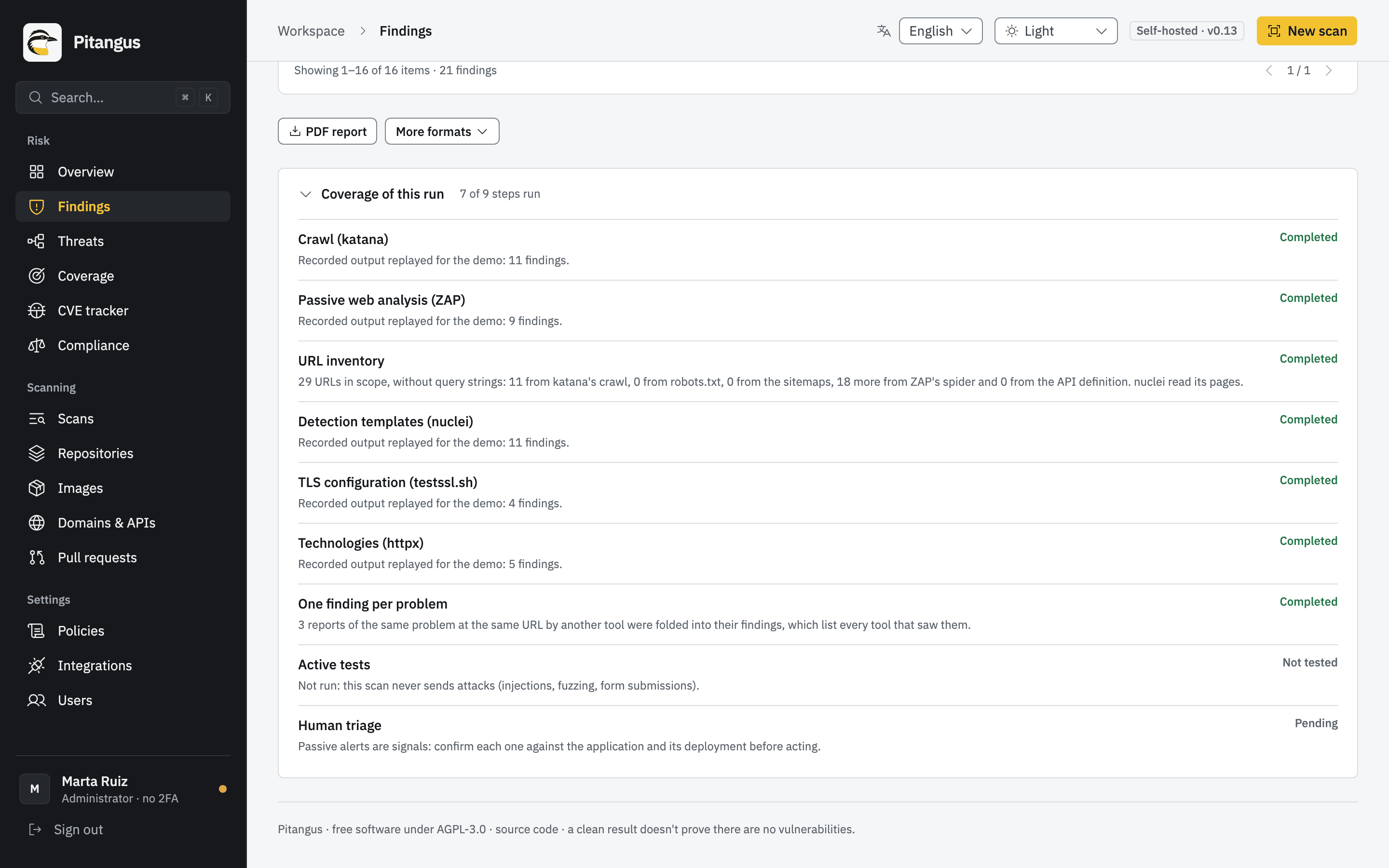
Section titled “Runs and steps”Every scan, PR review, SARIF import or daily advisory check is a run. A run records what was analyzed, when, by whom, and a list of steps: one per engine or phase, each with a status and a plain-language detail.
| Step status | Means |
|---|---|
| Completed | The step ran to the end. |
| Partial | The step ran but didn’t cover everything: a tool failed halfway, couldn’t reach a host, or a test user couldn’t sign in. |
| Skipped | The step didn’t apply or couldn’t start, with the reason (for example, a web tool’s image isn’t on the server). |
| Not tested | The engine didn’t run (Docker unreachable, image missing, or an option turned off). Nothing is claimed about what it checks. |
| Inconclusive | The engine ran but its answer can’t be trusted as complete, so it proves nothing. |
A run as a whole can be Queued, Scanning…, Completed, Partial, Incomplete, Inconclusive or Failed. Each run also lists its limitations: what the scan structurally can’t see (pages behind a login it didn’t reach, cross-file data flow, attacks it didn’t send).
Partial coverage
Section titled “Partial coverage”Partial coverage means part of what a scan was supposed to look at wasn’t looked at. Two consequences follow, and both are deliberate:
- Nothing is claimed clean when a tool didn’t run. Few or no findings in a partial run say nothing about the part that wasn’t covered. The run, its reports and the panel say so next to the results.
- Earlier findings aren’t marked fixed. If a tool didn’t finish or didn’t reach a host, what only that tool had seen stays open until a run that does reach it no longer reports it.
Findings and fingerprints
Section titled “Findings and fingerprints”A finding is one problem at one place: a vulnerable package version, a secret on a line, a misconfiguration in a file, a missing header at a URL. Each finding has a severity (critical, high, medium, low, info), a priority with its factors in view (Act now, Attend or Track, driven by CVSS, KEV and EPSS) and how to fix it, as far as the tool knows (a command, an example to adapt or the scanner’s own advice).
Each finding also gets a fingerprint: a stable identifier computed from what the problem is and where it is, never from a secret’s value. The fingerprint is how Pitangus recognizes the same problem in the next run, even if lines were added above it, and how triage, Jira issues and history follow it. When two engines report the same problem in the same place, they become one finding that names both.
Lifecycle: open, fixed, reopened
Section titled “Lifecycle: open, fixed, reopened”Each asset has a register with the current state of every fingerprint. It updates itself:
- Full scan. What appears stays open (or is reopened if it had been fixed). What was open and no longer appears is fixed automatically.
- Pull request review. Only what the PR introduces counts. A later commit in the same PR that removes it fixes it; a PR closed without merging withdraws its findings.
- Import from another tool. A later full import from the same tool fixes what that tool no longer reports. Pitangus’s own scans never fix an imported finding, and an import never fixes theirs.
- Verify again. After you push or deploy a fix, Reverify on a finding rescans that repository, image or domain. The finding then says Fixed ✓ · no longer found in the scan or Still present in the scan. If the scan was incomplete, it says so and proves nothing.
Triage
Section titled “Triage”Triage is recording a decision about a finding:
| State | Who | Needs |
|---|---|---|
| In progress | Any member | Nothing else |
| False positive | Any member | A reason |
| Accepted risk | Administrators only | A reason and an expiry date |
| Fixed (by hand) | Any member | A reason; if it reappears in a later scan it reopens by itself |
Each decision is kept in the finding’s history with the user and the date. Findings dismissed in triage don’t count as open, don’t fall due and aren’t exported to Jira, but they stay as evidence. Excluded paths (set per repository by an administrator) are different: they hide whole folders, such as test fixtures, with a reason. See Findings.
Roles: administrator and member
Section titled “Roles: administrator and member”| Role | Can |
|---|---|
| Member | Runs scans, triages and reviews results. |
| Administrator | Everything a member can, plus connects providers, manages users, accepts risks, adds and verifies domains, launches and schedules web scans, and sets excluded paths and due dates. |
Two-factor authentication (TOTP) is mandatory for administrators by default (PITANGUS_REQUIRE_TOTP). The first
account, created with the setup code, is an administrator.
Workers and background scans
Section titled “Workers and background scans”Starting a scan returns at once: the scan is queued in PostgreSQL and a worker picks it up. Each worker runs one scan at a time; to run more at once, add workers (Scaling). While a scan runs, its run exists with the status Queued or Scanning… and a live progress log written for people. When it finishes, the panel shows a notice. Restarting the server marks any scan left halfway as failed: launch it again.
Periodic work (watching pull requests, the daily advisory check, scheduled web scans, the local CVE copy) is run by one worker elected as leader.
Languages
Section titled “Languages”Everything stored for people to read (findings, progress, limitations, errors) is kept as a message code plus parameters, not as a sentence. It’s rendered in the reader’s language when read, so English and Spanish readers see the same finding in their own language and switching never needs a rescan. Third-party text, such as an advisory’s summary, is kept and shown as published.
Next steps
Section titled “Next steps”- Quickstart: see all of this on demo data.
- Findings: filters, triage, deadlines and exports in detail.
- Glossary.